







Your sign in to Office is an SSO (single sign on) which means the same credentials are used to sign into any school device, Office, wifi, and to print.
Access all the programs you need to design, create, and store your ideas, tasks, and assignments with O365. Start at school and finish at home. Autosave means you never lose work again!

INSTRUCTIONS:
- Email login: student number@sd79.bc.ca (for example: 123456@sd79.bc.ca) OR if you are staff, use your staff email
- Default password: First0779 (for students)
**you are PROMPTED AND REQUIRED every September start up to change the default password on a school device before your personal device(s) will connect to the FKSS BYOD student wifi. The library, Room 229, or any school issued laptop or iPad will work to accomplish this. - If you forget your password, the Teacher Librarian can reset to the default for you to start again.
Change Your Password for Office 365
- Open a private (Firefox)/incognito (Chrome) window in your browser by looking in the top right corner for 3 dots or lines which indicate a drop down menu.
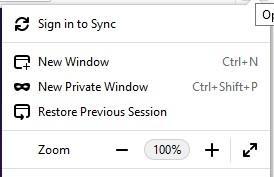
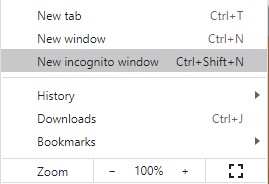
- Go to office.com and sign in with your username and password.
- Look for the cog wheel to the left of your initials in the top right corner and click for the drop-down.

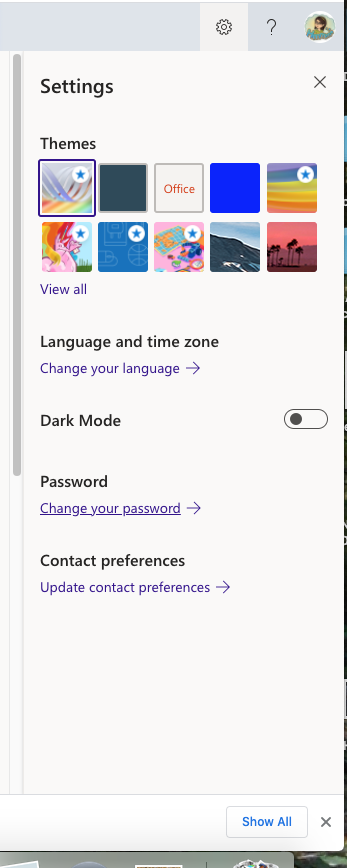
- Look for the “Change Password” link.
- You will be asked for your old password, your new one, and to confirm your new one.
- Remember that this password is connected to your wifi sign in, your printing release, and your Office account so you will need to re-authenticate your phone’s connections.
If you need to print at school, use the instructions below.
Destiny Discover
Search our collection of books!
Vetted Sources
Use these sources in your research as well as databases that are already vetted!